Axon Framework
In this blog we will try to discover how we can use the Axon framework in order to implement the Saga pattern using the orchestration approach .
Introduction
AXON is a powerful and comprehensive solution for building scalable and extensible applications. It provides the Axon Framework and Axon Server to help build applications centered on three core concepts: CQRS (Command Query Responsibility Segregation), Event Sourcing, and DDD (Domain-Driven Design).
While many types of applications can be built using Axon, it has proven to be particularly popular for microservices architectures. Axon offers an innovative and effective way to sensibly evolve to event-driven microservices within such an architecture.
Axon also provides robust support for implementing the Saga pattern, particularly for orchestration. In this section, we will explore the architecture of Axon and demonstrate how to implement an orchestration-based Saga pattern using Axon.
Architecture Overview
Before delving into the architecture of Axon, let's first understand the CQRS and Event Sourcing patterns.
Event Sourcing:
Event Sourcing is an architectural pattern that involves capturing all changes in the state of an application as a sequence of events. Unlike traditional approaches, Event Sourcing does not focus on the current state of the application but on the sequence of state changes, known as business events, that led to this current state. This sequence of events serves as a source of truth for the application. From this event sequence, it is possible to aggregate the current state of the application by replaying all events in chronological order. Each change in the application's state is triggered by a specific event, allowing the cause of each modification to be traced. For example, in the context of operations performed on a bank account, each deposit, withdrawal, or transfer would be recorded as a distinct event, enabling the complete transaction history of the account to be reconstructed.
How Event Sourcing works?
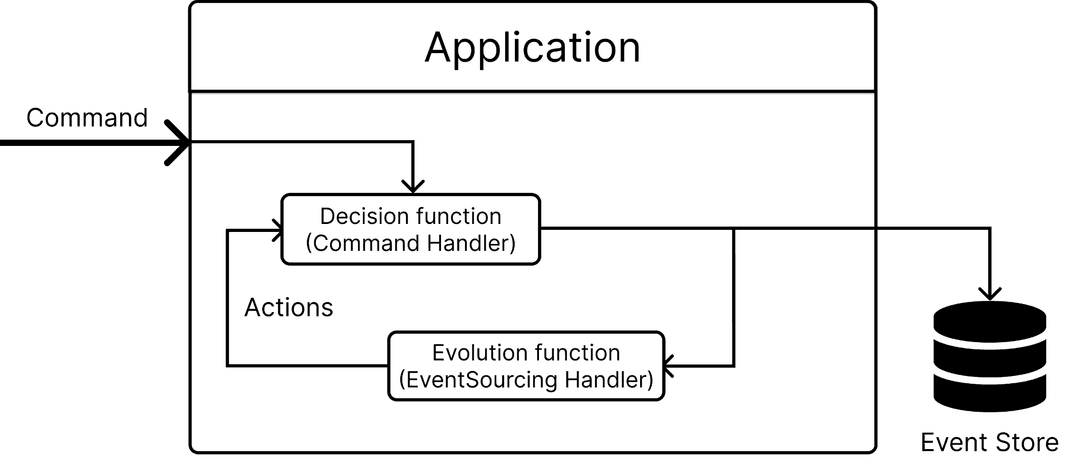
The Event Sourcing pattern operates through a series of interconnected components, each serving a distinct role in managing the application's state and behavior. It begins with a Command, which represents an external request or solicitation made to the system, often originating from user interface interactions. This Command triggers a Decision Function, a function that implements business rules and processes and is invoked by the Command. The Decision Function takes the current State and Command as input and produces a list of Events, which represent recent occurrences or changes in the system. These Events are immutable and self-descriptive, serving as a factual record of past actions. They are stored in an Event Store, a database that records all Events emitted by the Decision Function.
Following the emission of Events, the Evolution Function is invoked. This function, triggered by the Events emitted by the Decision Function, mutates the application's state based on the received Events. Unlike the Decision Function, the Evolution Function does not enforce business rules but solely focuses on updating the application's state. It takes the current State and Event as input and produces a new State.
Additionally, the system may initiate internal Commands, termed Actions, in scenarios where decisions are made in multiple stages or require the system to act upon itself. These Actions trigger side effects, such as publishing Events to partner applications, which must be carefully managed to ensure they occur only when the system is in a stable state, minimizing disruptions to partner applications. Overall, the Event Sourcing pattern provides a structured approach to managing state changes and ensuring the integrity and consistency of the application's data.
The following figure illustrate the Event sourcing pattern:
CQRS (Command Query Responsibility Segregation):
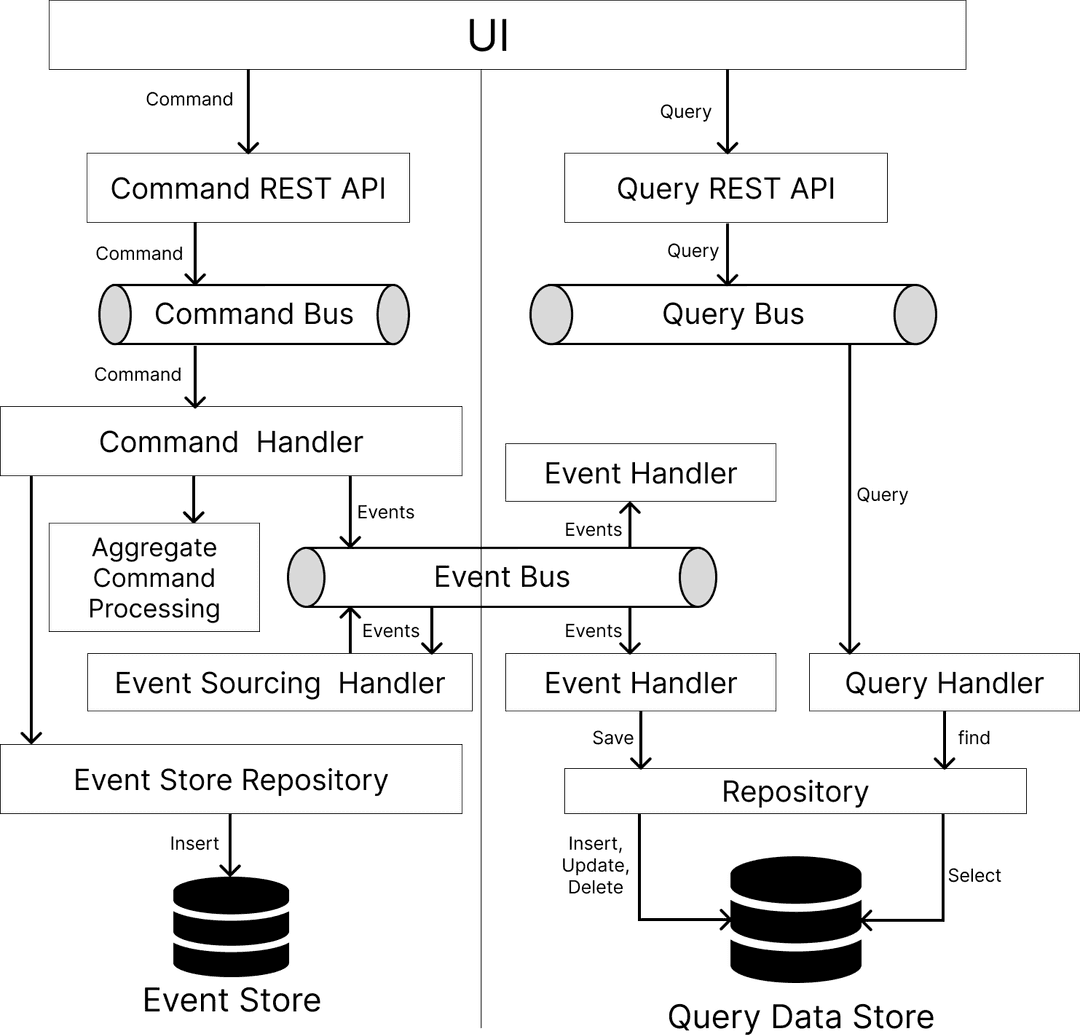
The Command Query Responsibility Segregation (CQRS) pattern involves separating the application's read and write components, allowing for independent optimization of each. In this pattern, Commands represent external requests aimed at modifying the state of an object, such as insert, update, or delete operations, while Queries represent intentions to retrieve information or the state of an object, similar to select operations in databases. Events symbolize actions that have occurred within the system and serve as a means of communication between different components. An Event Bus facilitates the distribution of events to event handlers, enabling loose coupling and scalability. This bus can be implemented using various messaging systems like Kafka or RabbitMQ. Additionally, an Event Store serves as a persistence mechanism for events published within the application, ensuring that event data is reliably stored and accessible for future processing. By adopting the CQRS pattern, applications can achieve better scalability, maintainability, and flexibility in managing both read and write operations separately.
The following figure illustrates the architecture of an application that utilizes the CQRS pattern:
AXON architecture:
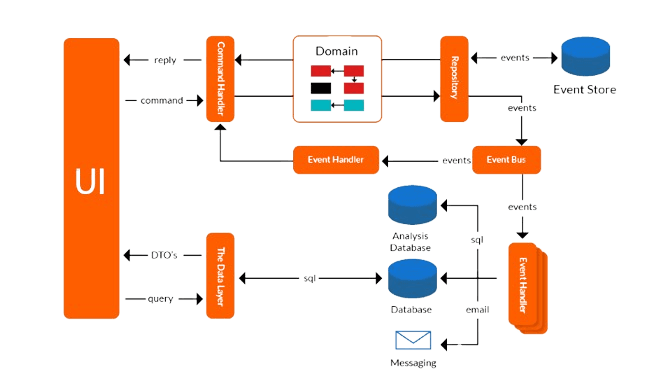
The Axon Framework provides a powerful architecture that complements the principles of Command Query Responsibility Segregation (CQRS) and facilitates the implementation of event-driven systems. At the heart of Axon's architecture lie its core components, meticulously designed to handle various aspects of application logic seamlessly. The Command Bus acts as the entry point for incoming commands, efficiently routing them to the corresponding Command Handlers for processing. These handlers encapsulate the business logic responsible for executing commands and generating corresponding events. Events, representing state changes within the system, are then propagated onto the Event Bus, which efficiently dispatches them to registered Event Handlers for further processing. Axon's Event Store serves as a reliable repository for persisting events, ensuring their durability and providing a historical record of all system changes. Additionally, Axon's Saga Manager facilitates the coordination of long-running business processes using the Saga pattern, orchestrating the sequence of events across multiple services. Furthermore, Axon Server offers a centralized platform for managing the messaging infrastructure, simplifying deployment and scaling of Axon-based applications.
This figure showcases the Axon architecture, providing a visual representation of its key components and their interactions:
SAGA Implementation with Axon Framework
We will build a microservices application with Spring Boot that has 3 independent microservices that are involved in a single transaction. We will use the Axon framework to handle the distributed transaction across these microservices.
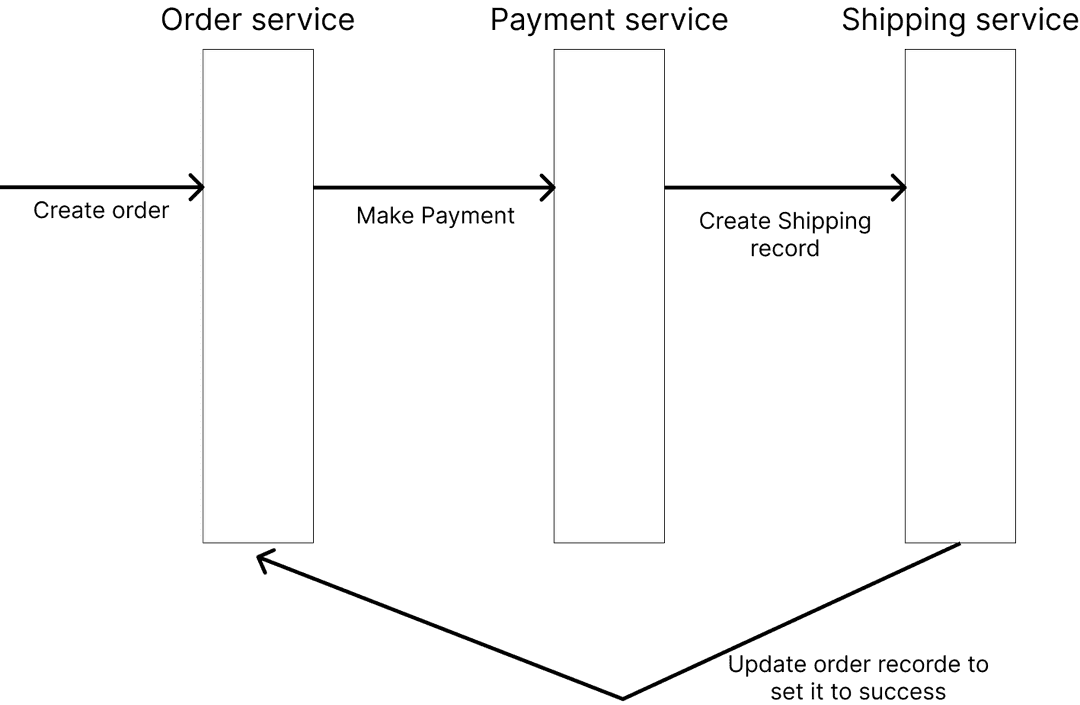
This demo consists of an Ordering system with three components ‘Order Service’, ‘Payment Service’ and ‘Shipping Service’. We will build all three components and manage the transaction with Axon.
You can find the source code for this blog here
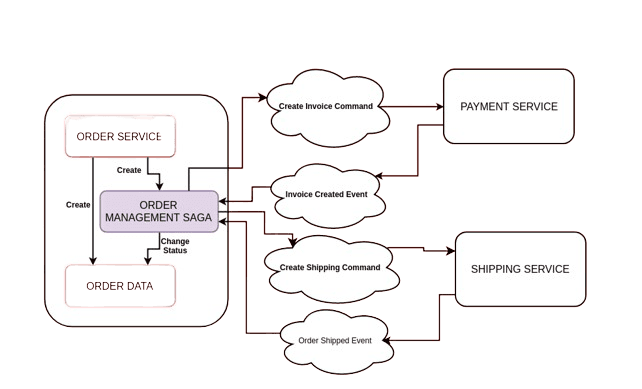
The perfect scenario should flow something like:
In more details the flow of our transaction will be as follows:
-
The client sends an HTTP request with order details to the Order Service to create an order.
-
The Order Service saves the order data in the database with a status of "ORDERED."
-
The Order Service then initiates the saga by creating an Order Management Saga (orchestrator).
-
The orchestrator sends a command to the Payment Service to complete the payment.
-
The Payment Service saves the payment data in the database and sends a "Payment Completed" event back to the orchestrator.
-
Similarly, the orchestrator sends a command to the Shipping Service.
-
The Shipping Service saves the shipping data in the database and sends a "Shipping Completed" event back to the orchestrator.
-
Finally, the orchestrator updates the order status to "COMPLETE" in the database.
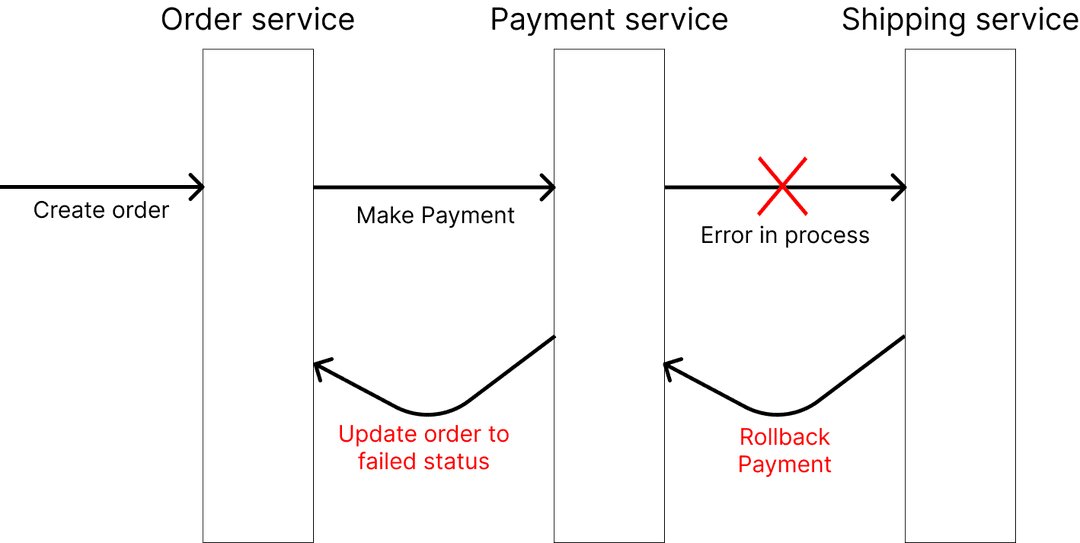
If one of these tasks does not succeed, we will need to rollback the previous tasks. For example:
in this example:
-
If the Shipping Service fails, the orchestrator will send a "Cancel Payment" command to the Payment Service.
-
The Payment Service will then cancel the payment by removing the payment data from the database.
-
It will then send a "Payment Canceled" event back to the orchestrator.
-
The orchestrator will subsequently cancel the order and update the order status to "CANCELED" in the database.
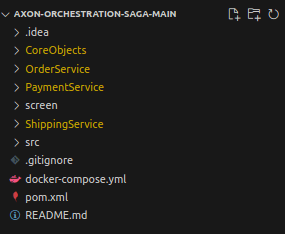
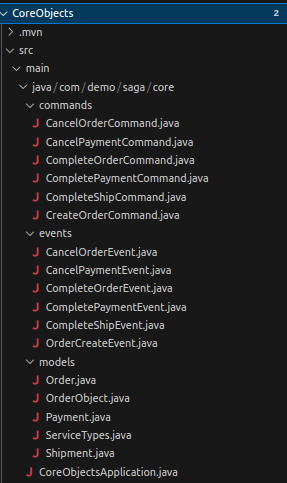
So, we will create a sample application using Spring Boot and the Axon Framework. Each service in our application will update its respective MongoDB collection to indicate a persistent transaction. In the event of a process failure, we will need to rollback or update the previous MongoDB records to reflect the failed transaction. The application is organized as a Maven multi-module project with the following structure:
The CoreObjects module has all the commonly used objects, models, commands and events used by the other 3 microservices.
In this module, we will define the Commands, Events, and Models (the actual data objects that will be stored in the database) to be shared among the three microservices.
Let us examine an example of a Command and an Event.
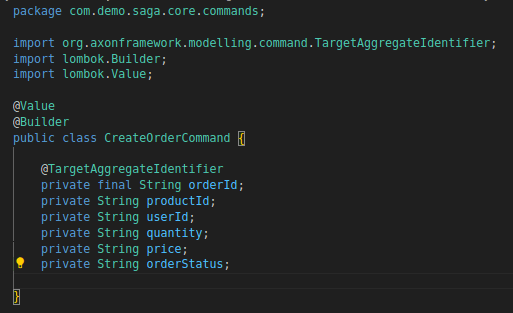
CreateOrderCommand:
The annotation @TargetAggregateIdentifier is applied to the orderId field, signifying that this field acts as the identifier of the aggregate (in this case, the order) targeted by the command. An aggregate can be perceived as a business object encapsulating a portion of the application's state. We will explore an example of an Aggregate later on. In our case each Microservice will have an Aggregate class that determines the flow of commands and the event each command fires.
We have defined the other commands in a similar manner.
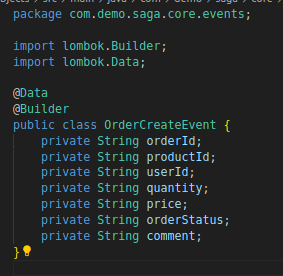
OrderCreateEvent:
As we can observe, an Event is essentially a straightforward Java class.
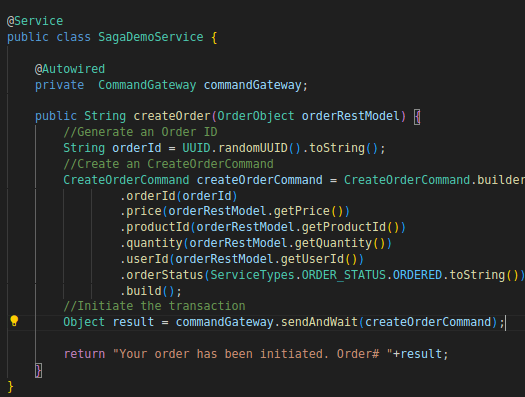
Now, let’s see the entire flow of a transaction in the code. First, a client will send a request to the Order Service with the order data to create an order.
A CreateOrderCommand is emitted:
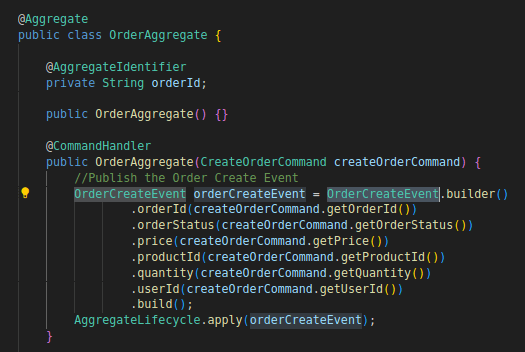
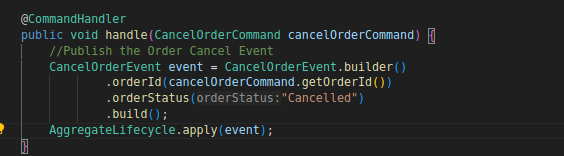
The OrderAggregate catches this command and then emits an OrderCreatedEvent:
This class is the Aggregate class of the order service, it will determine the flow of commands that have the orderId as an identifier and the events triggered by each command.
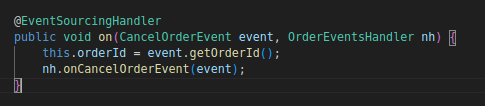
There are two handlers that listen to this event: the EventSourcingHandler, which saves the order data in the database:
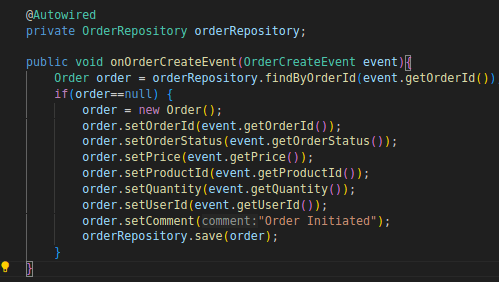
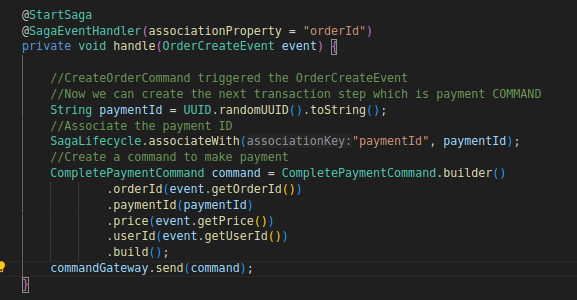
And the SagaEventHandler, which starts a saga:
This function is a part of the OrderSagaSystem class which is an instance of a saga (which can be thought of as a coordinator object) that orchestrates and coordinates a long-running business transaction.
In this class, we define the steps of the transaction.
After saving the order data in the database, the orchestrator (saga) emits the CompletePaymentCommand for the next transaction step.
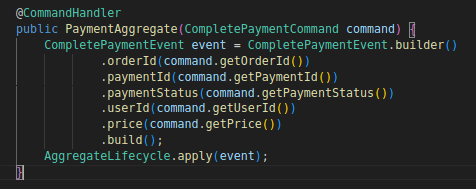
In the Payment Service, a CommandHandler (in the PaymentAggregate) listens to this command and creates a CompletePaymentEvent:
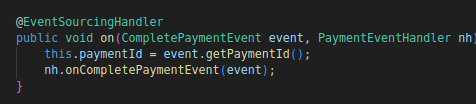
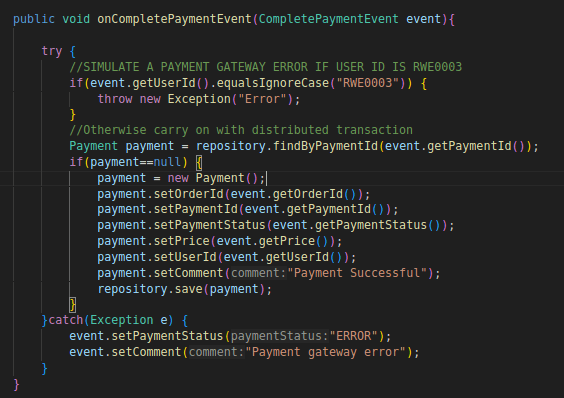
An EventSourcingHandler catches this event and saves the payment data in the database:
For testing purposes, a payment gateway error is simulated if the user ID is “RW003.” If an error occurs, the payment status is set to ERROR; otherwise, the payment data is saved in the database.
The saga (orchestrator) then catches the CompletePaymentEvent:
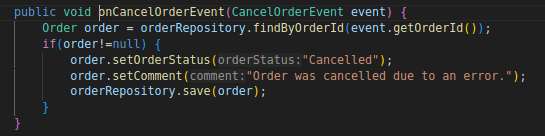
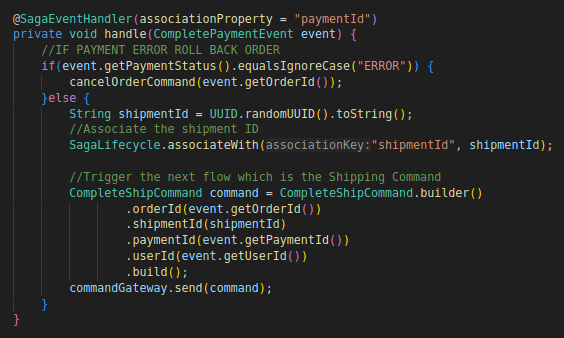
If the payment status is ERROR, the saga emits a CancelOrderCommand to cancel the order. The aggregate catches this command, sets the order status to CANCELED, and updates the order data in the database:
If the payment has passed successfully, the saga will then emit a CompleteShipCommand to the Shipping service.
Similarly, in the Shipping Service, a CommandHandler listens to the CompleteShipCommand and emits an event with a status of ERROR or SUCCESS. The saga in the Order Service catches this event.
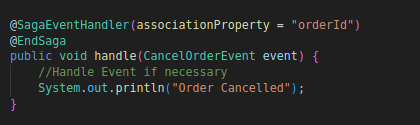
If the status is ERROR, the saga emits a CancelPaymentCommand to the Payment Service and a CancelOrderCommand to the Order Service before ending the saga:
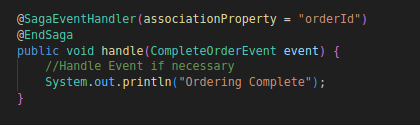
If the status is SUCCESS, the saga emits a CompleteOrderCommand to update the status of the order in the database to ORDERED, and then the saga ends:
Now that we have got an overview on how things work, let us test the application.
First, we need to run an Axon Serve. It acts as the event store and facilitates the communications and event streams between the different services.
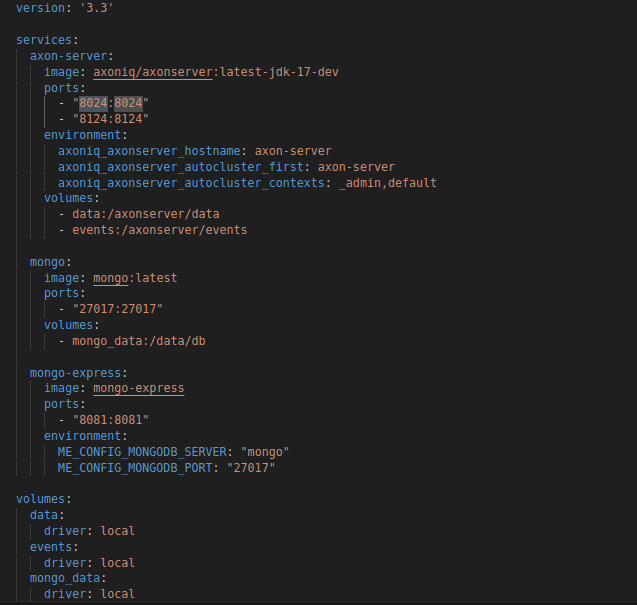
We can download it as a JAR file and run it, but we are using a Docker image for simplicity. Here is the Docker Compose configuration we use:
We use mongo-express to browse the collections.
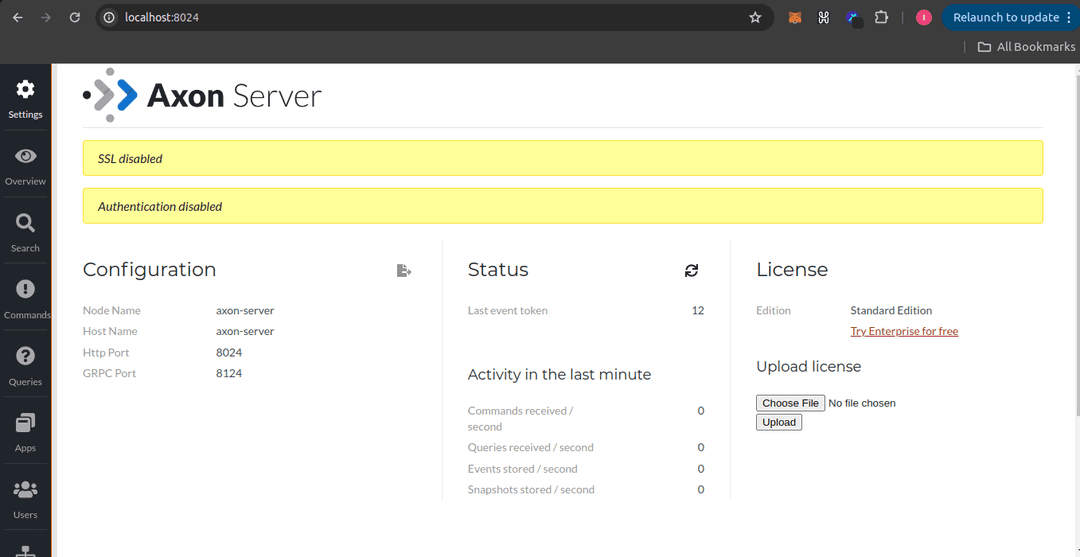
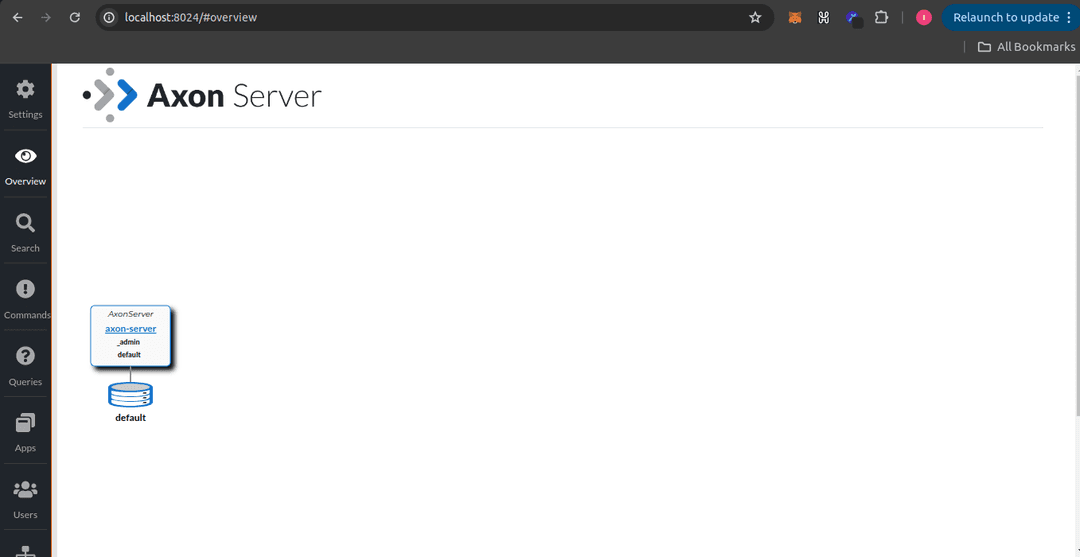
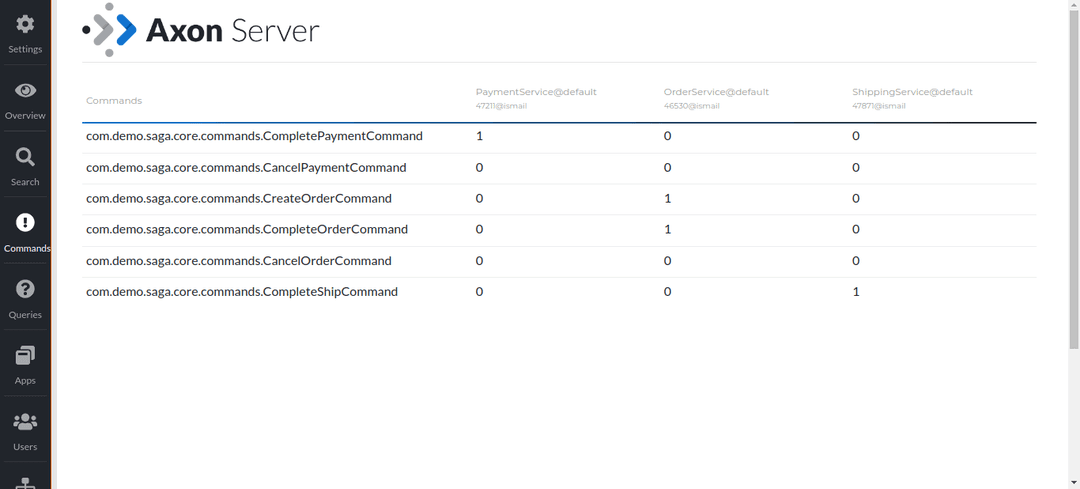
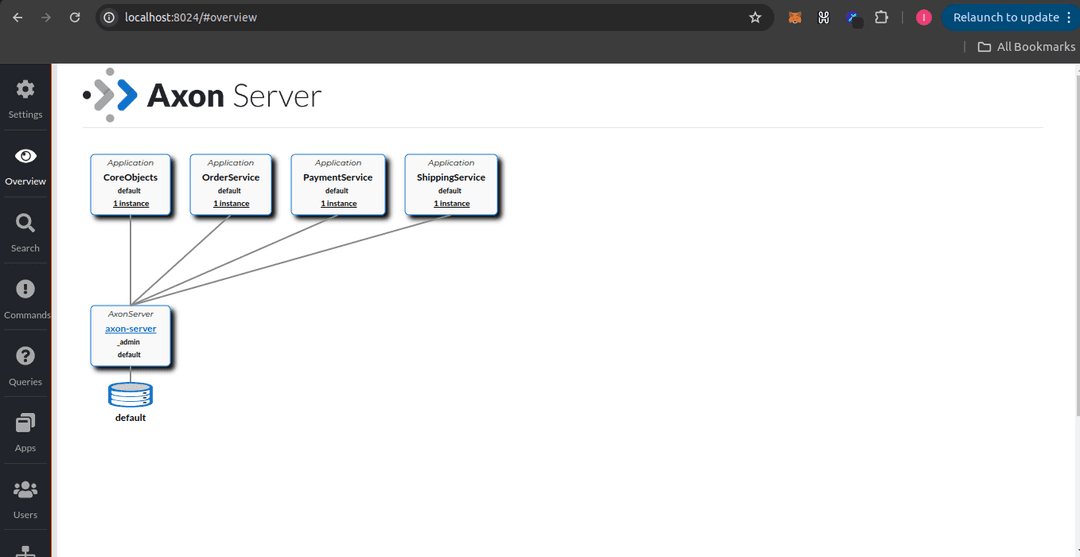
We can view the AXON UI at localhost:8024:
Without any applications connected to the server, we don’t see any activity in the Axon Server. Therefore, we need to run the microservices.
After running the microservices:
Testing a Successful Transaction:
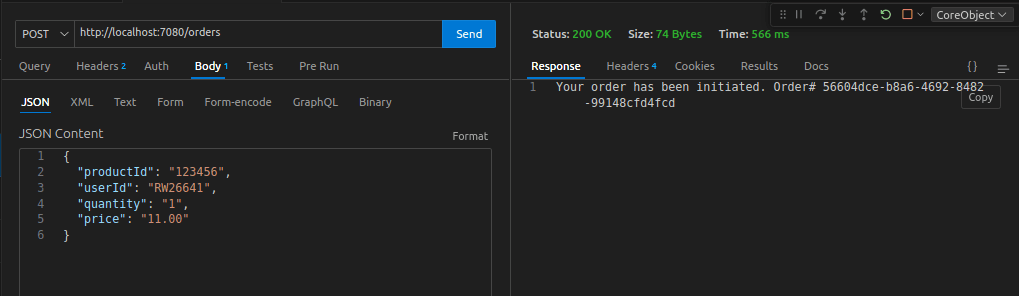
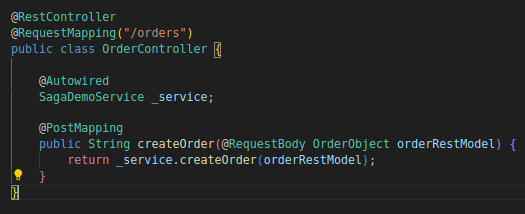
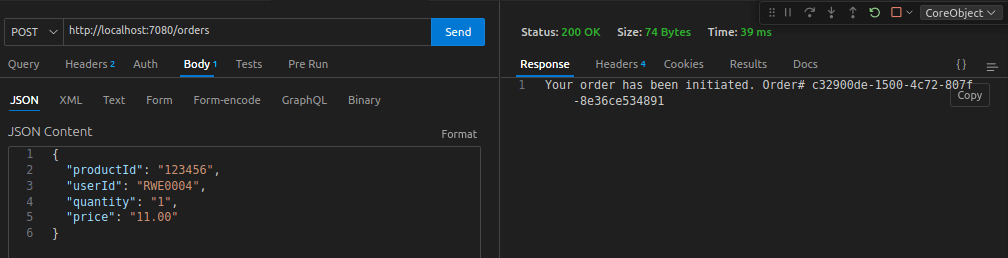
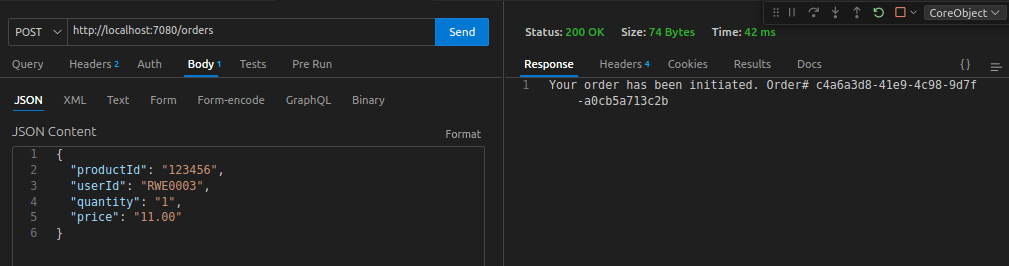
Now we will test a successful transaction. To do this, we will use the REST controller to initiate an order:
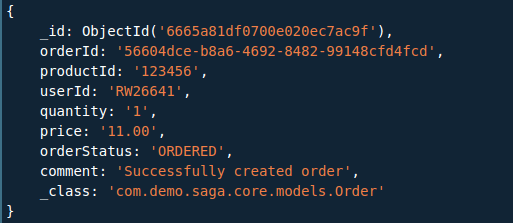
So looking at the Order Collection:
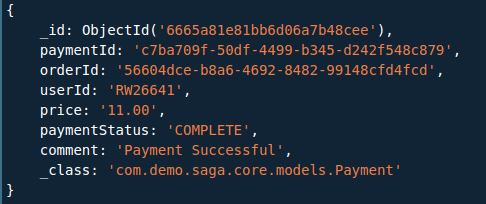
Payment collection:
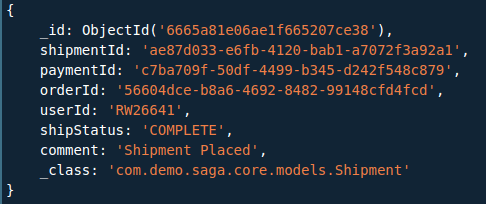
Shipment collection:
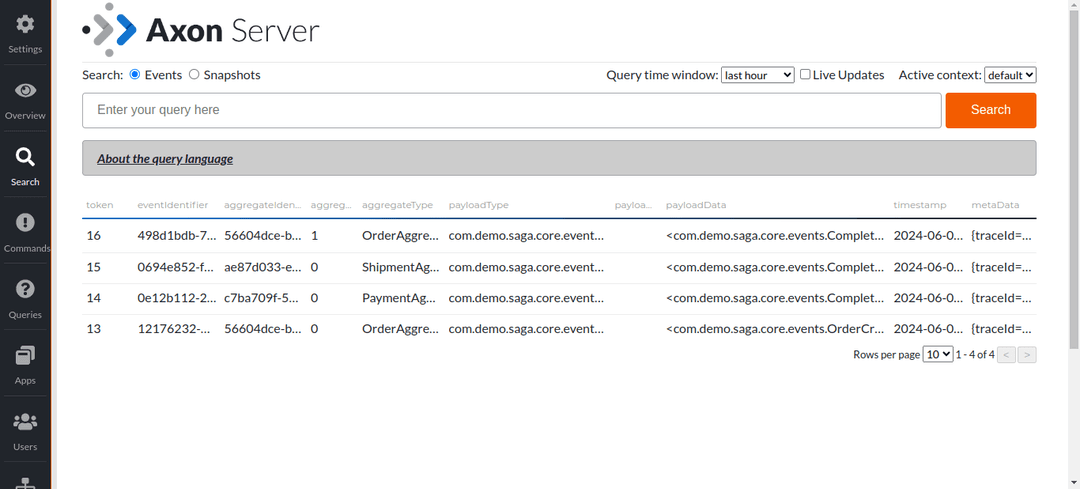
Looking at the Axon server UI, you can see all the commands and events executed:
Testing a Failure in Payment:
Next, we will test a failure in the payment process. Specifically, a payment failure will occur when the user ID is RWE0003:
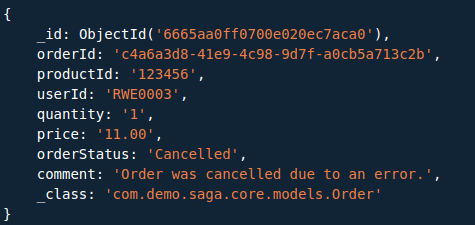
The Shipment MongoDB collection will not have an entry because the transaction did not progress to that point. Similarly, the Payment MongoDB collection will also lack an entry, as that is where the transaction failed. Therefore, the Order collection should indicate that the status was rolled back.
Thus, by examining the Order collection, we can see that the status is marked as canceled:

Testing a Failure in Shipment:
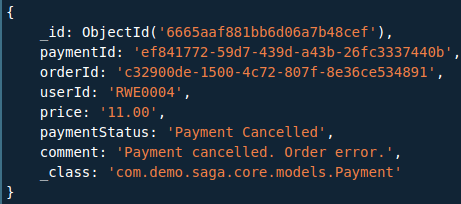
Now we will test a failure in the shipment process. So we will encounter a shipment failure when the userId is RWE0004.
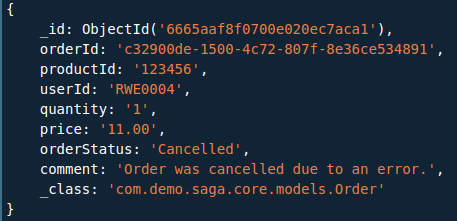
In this scenario, the Shipment Mongo collection will not contain an entry due to the failure. Consequently, the Payment and Order collections need to be rolled back.
Payment collection:
Order collection:
Upon observation, you'll notice that the orderId in both records within the distinct Order and Payment collections is identical, indicating it's the rolled-back transaction for the same order.